I have tried lot of times to connect nu wallet to ppc wallet but getting error message. “Fail to connect with ppc rpc server”/
any help?
I have tried lot of times to connect nu wallet to ppc wallet but getting error message. “Fail to connect with ppc rpc server”/
any help?
Have you followed this guide?
It sounds like you need to create a ppcoin.conf configuration file.
It’s like in this guide:
http://docs.nubits.com/v1.0/docs/creating-conf-file
except instead of the nu folder you’re looking for the ppcoin folder, and instead of a nu.conf you create a ppcoin.conf
Then inside the ppcoin.conf you would add the following:
rpcuser=typeanythinghere
rpcpassword=typesomethingelsehere
server=1
then you would restart Nu and Peercoin, and try to export the keys again.
I have followed this guide. Not working. 
I’m sorry if this is already obvious to you, but you do have a nu.conf as well as the ppcoin.conf, right? I can see how that part might be a little unclear in the above instructions…
The rpcuser/rpcpassword lines need to match exactly between both files and you will also need to restart the Peercoin client after making any changes to the ppcoin.conf file. (The “sever=1” line is technically only necessary for the ppcoin.conf file, not nu.conf).
The nu.conf file tells the Nu client which username and password to use when communicating with the Peercoin client.
He has mentioned in another post that the problem is resolved.
Thanks.
Problem solved.
I am trying to pair my wallets to withdraw the PPC that has been distributed over the last couple years, but I’m running into an issue…
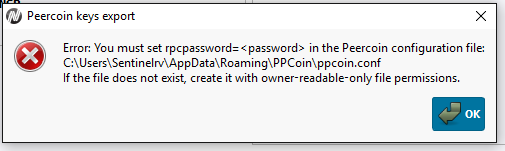
I created 2 text files, nu.conf and ppcoin.conf and both of them contain the same exact info. I restarted both clients, but I’m still running into the above error. The Peerunity wallet is brand new, so there is no password or anything preventing it from working (it is unlocked by default right?). What am I doing wrong?
Edit: Do the blockchains need to be fully downloaded in order for it to work?
did you put the ppcoin.conf in C:\Users\Sentinelrv\AppData\Roaming\PPCoin\ ? maybe you put both nu.conf and ppcoin.conf in the same directory, %APPDATA%/Nu ?
just wild guess, ps: i dont think there has been any PPC dividend distribution lately
No, they are in separate folders, Nu and ppcoin. Also I know there hasn’t been any distributions lately. I just want to take out all the PPC dividends that I previously received. I have never tried moving the dividends until now.
rpcpassword=xyz
has been set? i know , stating the obvious
maybe
rpcuser=something
server=1
rpcallowip=ip
is also needed, not sure about that, try “localhost” for ip
I don’t use standard dir for any wallets. I use this to start nu in a .bat file
nupath\nu.exe -conf=nupath\nu.conf -datadir=nupath
and this to start peerunity
peerunitypath\peerunity -conf=peerunitypath\peerunity.conf -datadir=peerunitypath
Can’t @Sentinelrv just dump the private key of his NSR address in Nu using the raw format and import it in peercoin?
That is certainly not as elegant as this approach, but if you need to write the wallet passphrase in cleartext into the config file then its not really that much less secure. I wouldn’t do either of those things on a Windows machine 
Here is what I’ve done so far. I installed Nu and Peerunity and let them fully download the blockchain. I created the nu.conf and ppcoin.conf text files in the following locations…
C:\Users\Sentinelrv\AppData\Roaming\PPCoin\ppcoin.conf
C:\Users\Sentinelrv\AppData\Roaming\Nu\nu.conf
In each text file I have exactly what appears below…
[quote]rpcuser=abc
rpcpassword=xyz
server=1[/quote]
I actually used abc and xyz, so if these were only supposed to be examples that I was supposed to replace with correct information then please tell me.
The error message above said to create the text files with owner-readable-only file permissions, so for each file I right clicked and selected properties. I then checked off read-only.
Doing the above hasn’t gotten me any closer and I’m still receiving the same error message. The error message also shows the password with <> around it. I tried that, but still had no luck.
Here are a couple questions…
Do the text files have to be in read-only mode?
My Peerunity wallet is new and unencrypted. Does that mean it is completely unlocked and there is nothing extra I have to do?
Do both wallets have to be fully unlocked or just Peerunity? My Nu wallet has been locked the whole time. When I click to export Peercoin keys it asks me for my wallet passphrase though, so I assume it doesn’t need to be fully unlocked.
If I were to install an older version of Nu, is it possible that would allow it to work? Maybe there is a bug with newer versions?
Perhaps you will have better luck with the standard PPCoin client?
Your Nu wallet will need to be unlocked, though.
Do you know the steps to do that in the console?
sure, type:
walletlock (this is assuming you have the wallet unlocked for minting only)
walletpassphrase password_here 9999999
walletlock (this will lock it again after you have exported the PPC keys)
Then you can unlock for block minting only like normal.
@Sentinelrv, these are my ppcoin.conf & nu.conf files for importing NuShare dividend keys:
rpcuser=abc
rpcpassword=xyz
server=1
listen=1
rpcallowip=*
server=1
rpcuser=abc
rpcpassword=xyz
rpcuser & rpcpassword must be the same in both files
I am using PPCoin.